FESCO Online Bill
Check FESCO online bill or duplicate bill on this page. Your electricity bill payment is due for October 2025. So you need to get your FESCO bill online and pay your bill online as well. We are offering a free website to download FESCO bill online using your reference number or consumer ID.
How to Check FESCO Online Bill?
You can check your fesco duplicate bill on our bill check website. We are offering a free services for all types bill checking like MEPCO, GEPCO, LESCO and IESCO. Here is the step-by-step complete guide on how to check your electricity bill copy online on our website.
1) Visit Our Electricity Bill Check Website
The first step is to open your web browser like Chrome or Firefox. Now go to “https://onlinebillchecks.pk/”. Make sure you are on the correct website.
2) Enter Your Electricity Bill’s Consumer ID or Reference Number
The next step is to check your bill’s reference number or consumer ID to get your FESCO electricity bill. Just enter your reference number inside our online bill checker tool and tap on the “Check Your Bill” button.
3) Check FESCO Bill Online
The last step is to check your duplicate bill or you can download bill online. Just tap on the download button and get your comprehensive bill details in PDF format.
How to Download FESCO Duplicate Bills?
If your bill is pending for October 2025 then you need to check your bill status on our website and download your FESCO e-bill online. Follow this guide for downloading process.
- Enter your FESCO reference number and click on the “Download FESCO Bill” button.
- Now check whether you have entered a correct ID number and proceed to the next page.
- Here you can see a download button to get your duplicate bill online in PDF file.
How to Print My Electricity Bill Online?
Printing your electricity bill is simple and quick. You only need a stable internet connection, a printer, and your reference number. Follow these easy steps:
- Go to the FESCO Bill Website: Open your browser and visit the official FESCO online bill page.
- Enter Your Reference Number: Type your 14-digit reference number in the search box and click on the “Check Bill” button.
- View Your Bill: Your current electricity bill will appear on the screen. Check all the details to make sure they are correct.
- Connect Your Printer: Make sure your printer is properly connected to your laptop or PC and has enough ink and paper.
- Print the Bill Directly From Our Website: Press Ctrl + P on your keyboard or click the Print option from your browser menu. Choose your printer, set the number of copies, and click Print.
How to Get Your FESCO Bill 14 Digit Reference Number or 10 Digit Consumer ID?
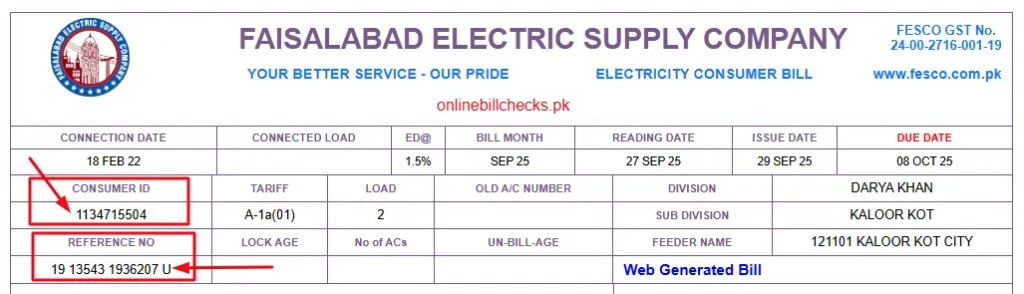
When you need to check your FESCO duplicate bill you need to have either your 14 digit reference number or 10 digit consumer ID. Without these numbers, you can not check your bill online. For your ease, we have labbled the reference number in the below picture. So you can check the picture and see where to get your reference number.
How to Pay a FESCO Bill?
Paying your FESCO bill on due date is very mandatory. If you pay your bill after a due date you will be charged with late payment fine. However, if you are not sure about how to pay your electricity bill payment then this guide is for your ease.
Online Bill Payment
You can use online payment methods like JazzCash or EasyPaisa to pay your electricity bill. Here are the steps to follow.
1) JazzCash Payment:
2) EasyPisa Payment:
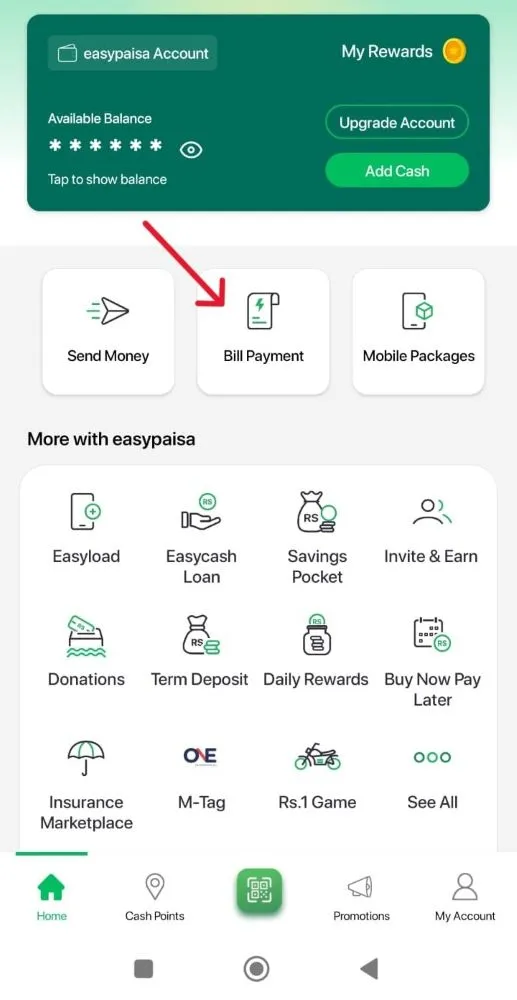
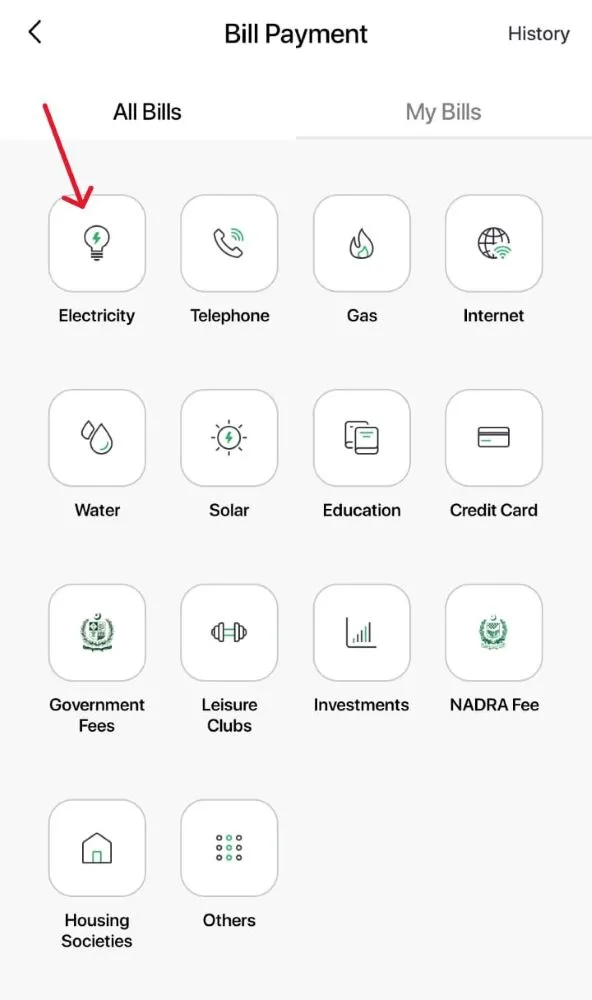
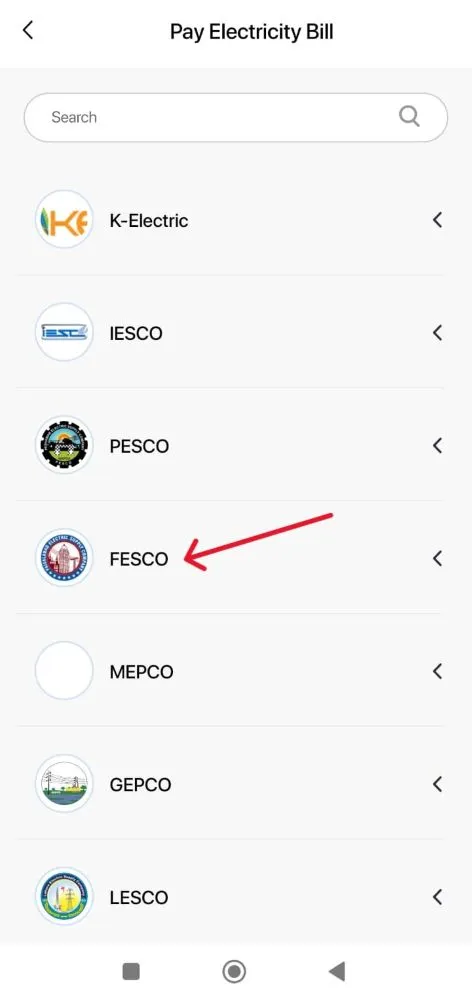
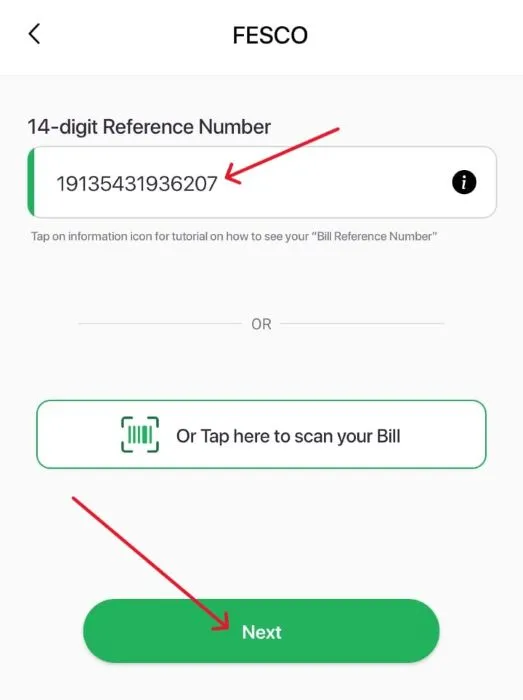
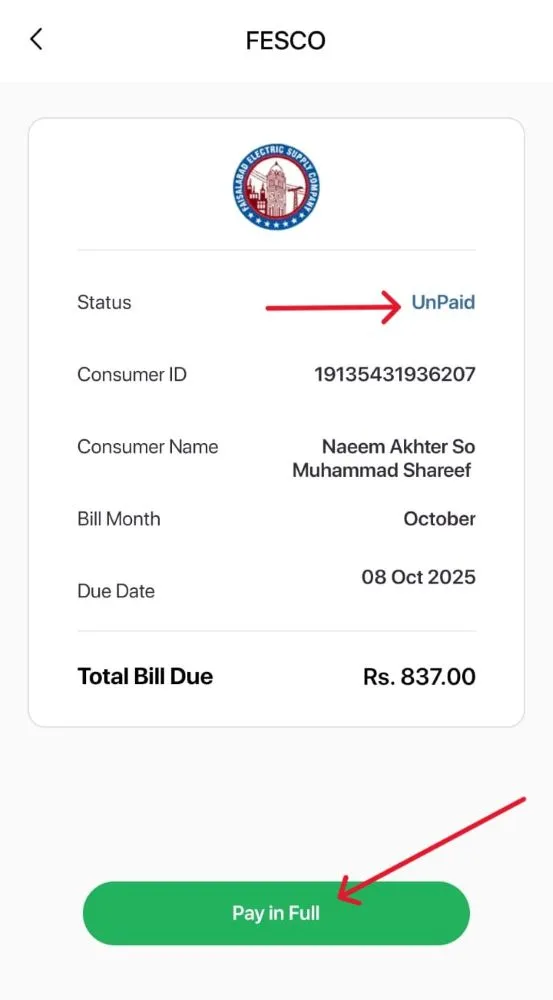
- Go to “Bill Payment” and then “Electricity”.
- Pick FESCO from the list as your service provider.
- Enter your 14 digit reference number inside the app and get your bill amount.
- Pay the bill online and get a receipt.
3) Mobile Banking Apps:
- Choose any banking app like MCB bank or Meezan Bank.
- Now go to “Utility Bills” section and choose “FESCO”.
- Enter your FESCO reference number and pay the bill online.
Offline Bill Pay Method
- You can go to any bank, EasyPaisa or JazzCash retailer store.
- Give your paper bill to the recipient and hand over the cash as well.
- Get a receipt from the cashier, and that’s it.
Faisalabad Electric Supply Company (FESCO)
| Field | Details |
|---|---|
| Full Name | Faisalabad Electric Supply Company |
| Abbreviation | FESCO |
| Established Date | March 21, 1998 |
| Legal Framework | Companies Ordinance, 1984 (now Companies Act, 2017) |
| Parent Organization | Water and Power Development Authority (WAPDA) |
| Main Purpose | To improve electricity distribution and customer service in the Faisalabad region |
| Number of Consumers | 5.7 million |
| Service Areas | Faisalabad, Jhang, Toba Tek Singh, Sargodha, Mianwali, Khushab, Bhakkar, Chiniot |
| Main Functions | – Distribute electricity to homes, businesses, and industries- Expand and maintain distribution network- Reduce line losses and prevent power theft- Manage billing and customer support- Implement government energy policies |
| Economic Role | Supports Pakistan’s textile industry and regional economy by providing reliable electricity |
Faisalabad Electric Supply Company (FESCO) is one of Pakistan’s leading electricity distribution companies, serving about 5.7 million consumers across central Punjab. It was established on March 21, 1998, under the Companies Ordinance, 1984 (currently Companies Act, 2017), to improve electricity distribution and customer service in the region.
Before FESCO, the Water and Power Development Authority (WAPDA) managed power generation, transmission, and distribution together, but growing electricity demand led the government to separate these functions for better efficiency. FESCO took charge of distribution in districts like Faisalabad, Jhang, Toba Tek Singh, Sargodha, Mianwali, Khushab, Bhakkar, and Chiniot.
It remains linked with WAPDA as part of Pakistan’s power structure, where WAPDA oversees water and hydropower, NTDC manages transmission, and FESCO handles distribution. The company focuses on delivering stable electricity, expanding and maintaining networks, reducing losses, improving billing, and adopting modern technology to prevent theft and enhance service.
What Are the Benefits of FESCO Online Bill Checker Tool?

Here are the features and benefits of FESCO online bill checker tool.
Mobile-Friendly Interface
The tool works smoothly on mobile phones, so you can check your bill anytime and anywhere.
Check Old Bills
You can view and download your previous bills, which helps you track your payment history.
Get Duplicate Bills
If you lose your original bill, you can quickly download a duplicate copy online.
Easy to Access
The tool is simple to use and does not require any technical skills. Anyone can use it in a few clicks.
24/7 Availability
You can check your bill at any time, day or night, without waiting for office hours.
Save Time and Effort
It removes the need to visit customer service centers, helping you manage your bills from home.
Multiple Bill Payment Options
You can pay your bill using multiple payment options like JazzCash, EasyPaisa or banking apps.
Bill Alerts via SMS Service
Consumers can choose to subscribe to the FESCO bill SMS service to get the bill details every month.
FESCO Bill Email Service
Users can also subscribe to the email service to get the e-bill via email.
Taxes & Government Charges Details
FESCO is a government operated company so it comes with government charges and some taxes. Here are the details of all the charges that you are paying.
FC Surcharge
Financing Cost surcharge OR FC surcharge is a tax implimented by FESCO. This is a fixed tax that cost at 43 paisa per unit to each consumer.
FPA
As the FESCO uses the crude oil to generate electricity so it has a Fuel Price Adjustment or FPA tax. This tax can vary due to changing prices of fuel.
Energy Charges
These are the charges that company imposes based on the base of consumption of electricity of a consumer.
Quarterly Tariff Adjustment
As the name suggest, these are the charges that you need to pay once in 3 months.
TV Fee
Every FESCO consumer has to pay Rs. 35 for the support of Pakistan Television. This tax payment is imposed by the government.
General Sales Tax
The government of Pakistan has a fixed 17% general sales tax on all the FESCO bills.
Fixed Charges
These charges are generally charged at the base of the utility of a consumer. The calculation is based on the per kilowatt-hour according to the maximum power usage of the customer.
FESCO Coverage Areas – Districts and Cities
Faisalabad Electric Supply Company (FESCO) supplies electricity across a large part of central Punjab. Its service area covers 8 districts, including major cities, towns, and rural areas. Faisalabad is the main hub of FESCO’s operations, but the company ensures a stable power supply to all regions under its network.
Below is the list of all districts and their main cities where FESCO provides electricity:
| Faisalabad District | Sargodha District |
|---|---|
| Sammundari | Bhera |
| Jaranwala | Shahpur |
| Chak Jhumra | Kot Momin |
| Tandlianwala | Sillanwali |
| Saddar | Bhalwal |
| Faisalabad City | Sargodha City |
| Sahiwal |
| Jhang District | Toba Tek Singh District |
|---|---|
| Shorkot | Gojra |
| Ahmad Pur Sial | Pir Mahal |
| 18-Hazari | Toba Tek Singh City |
| Jhang City | Kamalia |
| Bhakkar District | Khushab District |
|---|---|
| Kallur Kot | Quaidabad |
| Mankera | Khushab City |
| Darya Khan | Noorpur Thal |
| Bhakkar City | Naushera |
| Mianwali District | Chiniot District |
|---|---|
| Isa Khel | Lalian |
| Piplan | Chiniot City |
| Mianwali City | Bhowana |
FESCO Bill Issues and Solutions
FESCO customers may face some common billing issues, but most of them are easy to solve. Here are the frequent problems and how you can fix them:
- Wrong Electricity Consumption: Sometimes, the bill shows an incorrect unit reading, leading to higher or lower charges. To fix this, visit your nearest FESCO office and submit an application for correction. The staff will check your meter reading and issue a revised bill.
- LP Surcharge (Late Payment Charges): LP stands for late payment. In some cases, customers receive this fine even after paying the bill on time. If this happens, contact FESCO customer support at 118 or UAN 0800-66554 and explain the situation. The support team will verify your payment and remove the extra charges if they were added by mistake.
- Double Payment: If you accidentally paid your bill twice, you can easily resolve this issue. Call the FESCO helpline and request a refund or bill adjustment. The extra payment will be adjusted in your next month’s bill.
Best Tips for Saving Money on Electricity Usage
- Turn Off Devices When Not in Use: Always switch off lights, fans, and other appliances when leaving a room. Even standby power uses electricity, so unplug chargers and devices when they’re not needed.
- Use Off-Peak Hours: Electricity is more expensive during peak hours (usually 6 PM to 10 PM). Try to run heavy appliances like washing machines or irons outside these hours to save money.
- Use Solar Energy: Installing solar panels can cut your electricity costs significantly. Many Pakistani homes now use solar systems to reduce dependence on the national grid.
- Use Natural Light and Air: During the day, open curtains and windows instead of switching on lights and fans. It’s free and reduces power use.
Customer Service Centers
ESCO provides reliable customer support to help users with billing, new connections, complaints, and other electricity-related services. Customers can visit the service center or contact the support team through phone or fax for quick assistance. The team is available to solve issues and guide consumers efficiently.
Contact Details:
- Address: West Canal Road, Abdullah Pur, Faisalabad, Pakistan
- Telephone: +92-41-9220184, +92-41-9220229
- Fax: +92-41-9220233
- Customer Helpline: 118
- UAN: 0800-66554
- Email: support@onlinebillchecks.pk
F.A.Q
How to view and download fesco current bill?
If you want to view and download the fesco bill for this month then you need to enter your 14 digit reference number on this website and get your complete bill online.
Can I print my bill on smartphone?
No, you need to have a printer to print any old or new FESCO bill.
Can I check my old paid fesco bills?
Yes, you can easily check all the old paid fesco bills online on our website.
How to check my bill payment status?
If you are not sure whether your Wapda bill is paid or not then you can check your payment status easily. All you need to do is just enter your bill’s reference number and get your payment status.
What are the options available for bill pay?
You can use different methods to pay your bill like EasyPaisa, JazzCash, SadaPay or banking apps.
What are the peak hours?
Peak hours are the hours when you should avoid using heavy wattage appliances like Water Pump or AC. The peak hours are as follows:
- April – October: 6:30 PM to 10:30 PM
- November – March: 6:00 PM to 10:00 PM
What is FESCO MIS?
FESCO Management Information System (MIS) is an online system that helps Faisalabad Electric Supply Company manage and organize important business data.
How to apply for FESCO electricity connection?
You can apply for a FESCO electricity connection easily. You need to visit the FESCO office and submit the application for a new connection. You also need to pay the one time fee for the new connection and that’s it.
Our Other Electricity Duplicate Bill Checking Services
- FESCO Online Bill
- MEPCO Bill Online
- GEPCO Bill Online
- LESCO Bill Online
- IESCO Bill Online
- HESCO Online Bill
- SEPCO Bill Online
- QESCO Bill Online
- TESCO Bill Online
- PESCO Bill Online
Contents
- 1 How to Check FESCO Online Bill?
- 2 How to Download FESCO Duplicate Bills?
- 3 How to Print My Electricity Bill Online?
- 4 How to Get Your FESCO Bill 14 Digit Reference Number or 10 Digit Consumer ID?
- 5 How to Pay a FESCO Bill?
- 6 Faisalabad Electric Supply Company (FESCO)
- 7 What Are the Benefits of FESCO Online Bill Checker Tool?
- 8 Taxes & Government Charges Details
- 9 FESCO Coverage Areas – Districts and Cities
- 10 FESCO Bill Issues and Solutions
- 11 Best Tips for Saving Money on Electricity Usage
- 12 Customer Service Centers
- 13 F.A.Q
- 13.1 How to view and download fesco current bill?
- 13.2 Can I print my bill on smartphone?
- 13.3 Can I check my old paid fesco bills?
- 13.4 How to check my bill payment status?
- 13.5 What are the options available for bill pay?
- 13.6 What are the peak hours?
- 13.7 What is FESCO MIS?
- 13.8 How to apply for FESCO electricity connection?
- 14 Our Other Electricity Duplicate Bill Checking Services